How to Automate WhatsApp Appointment Booking with an AI Chatbot
Automate WhatsApp appointment booking with an AI chatbot. Cut no-shows, book 24/7, and sync with Google Calendar. See how with 2Chat.

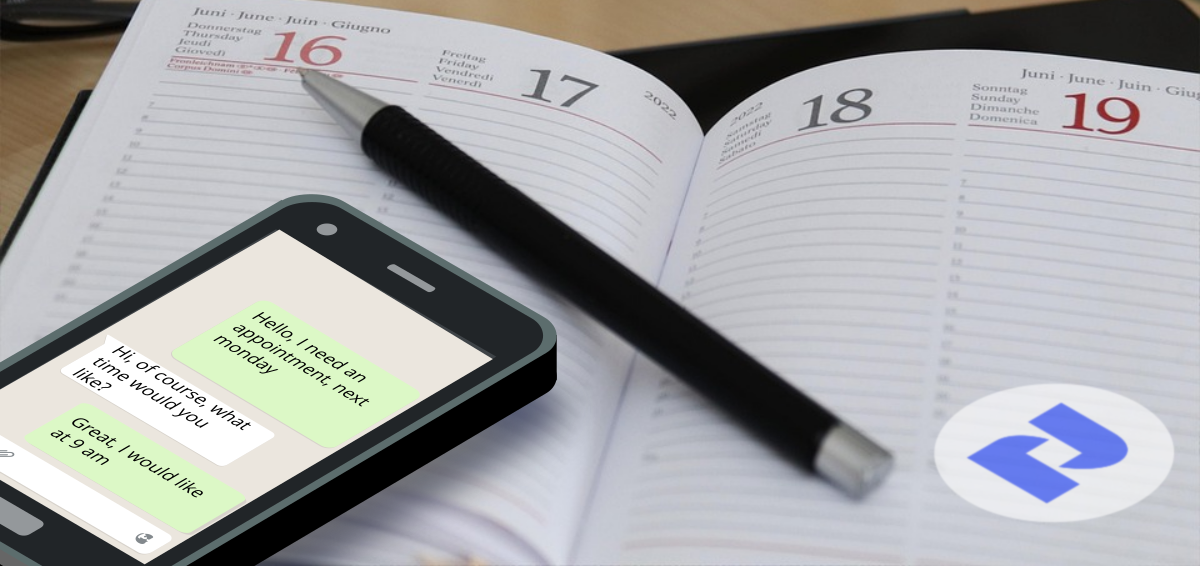
If a client tries to book with you at 9 p.m. and your phone goes to voicemail, you've probably already lost them to whoever answers first. WhatsApp appointment booking with an AI chatbot fixes that. It talks to the customer, checks your calendar, and confirms the slot, all without anyone on your team touching a keyboard. This guide covers why appointment booking is moving to WhatsApp, what you need before you start, and two ways to build it: a no-code chatbot with 2Chat and n8n, or an AI voice agent for the customers who'd rather call.
Why Businesses Are Moving Appointment Booking to WhatsApp
Most of your customers already have WhatsApp open. For a dental clinic, a hair salon, a med spa, or a real estate agent following up on a showing, that's the channel people actually reply to. Not a contact form buried on a website. Not a phone call they have to plan around.
A WhatsApp booking system built on the WhatsApp Business API can hold a full conversation: greet the customer, ask what service they need, offer available times, and confirm the appointment. It does that at 11 p.m. on a Sunday just as easily as at 11 a.m. on a Tuesday. That's the core appeal of whatsapp appointment scheduling — it doesn't wait for business hours, and it doesn't put a customer on hold.
A few concrete examples of what that looks like by industry:
- A dental or med spa clinic can let patients book, reschedule, or ask about a specific treatment without calling during the exact hour the front desk is free to pick up.
- A real estate agent can confirm a property showing the moment a lead replies from a listing, instead of playing phone tag while another agent's listing gets the appointment first.
- A home services business (plumbing, HVAC, cleaning) can let customers pick an arrival window and get an automatic confirmation, cutting down on the back-and-forth that usually takes several separate calls.
- A salon or barbershop can handle routine rebooking ("same time next month?") entirely through WhatsApp, so staff don't have to stop mid-service to answer the phone.
The businesses getting the most out of this are the ones where a missed call usually means a missed sale: healthcare and wellness practices, home services, salons and spas, and real estate. If double-booking or no-shows are already a pain point, an appointment booking chatbot removes the manual back-and-forth that causes most of it.
Think about what booking looks like today without automation. A customer calls, gets voicemail, maybe tries again later or just calls a competitor instead. Or they message your business Instagram or Facebook page, and that message sits there until someone on your team has a free minute to check it and cross-reference your calendar by hand. Every one of those steps is a place where a customer can give up. A whatsapp appointment scheduling flow collapses all of that into a single conversation that starts the moment the customer is ready to book, not whenever your team happens to be free to answer.
This automated process not only saves time but significantly enhances the customer experience, making it easier for them to do business with you.
What You Need Before You Start
You don't need to be a developer to set this up, but you do need three accounts:
- A 2Chat account connected to a WhatsApp Business API number. This is what sends and receives the WhatsApp messages. Unlike a personal WhatsApp number, the Business API lets you connect it to automation tools and have multiple people, or an AI agent, manage the conversation.
- An n8n account, the automation tool that connects WhatsApp, your calendar, and the AI agent together. n8n has a free tier that's enough to get started, and its visual, node-based editor means you're arranging pre-built blocks instead of writing code.
- A Google Calendar (or Cal.com) account where your real availability lives, so the chatbot never offers a slot you don't actually have. If you already block off time for lunch, staff meetings, or personal appointments, the chatbot respects that the same way a human receptionist would.
Once those three are connected, the rest of the setup lives inside n8n's visual workflow builder, and no code is required. Most businesses can get a working version running in an afternoon. The part that usually takes longer is deciding on your exact booking rules (how much notice you need, how long each service takes, how many bookings you'll allow per hour), not the technical setup itself.
The Backend Magic: How Your AI Chatbot Works (Powered by n8n)
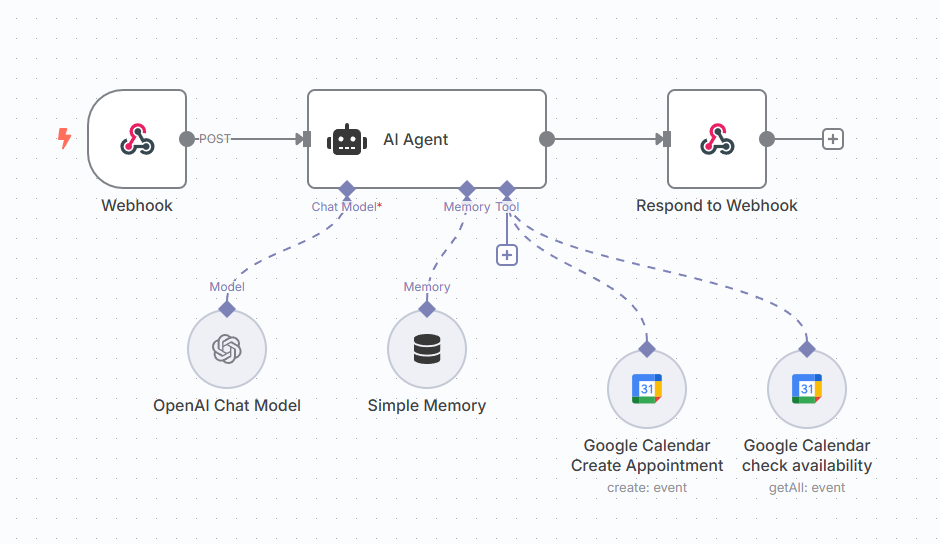
Now, let's peek behind the curtain at the sophisticated yet straightforward setup that makes this possible using n8n, a powerful workflow automation tool. You can download the n8n template from the following link, and you can import.
 2ChatCo
Your n8n workflow acts as the brain of your chatbot, connecting WhatsApp (via 2Chat) to your Google Calendar and an advanced AI agent. Here’s a simplified breakdown of the core components:
The Webhook: Your Chatbot's Inbox
This is the entry point for all incoming WhatsApp messages from 2Chat. It acts like a digital mailroom, receiving messages and forwarding them to the AI agent for processing.
The AI Agent: The Intelligent Conversationalist
This is where the magic of artificial intelligence happens. The AI Agent node uses a Chat Model (like OpenAI's GPT) and a Simple Memory component to:
Understand Context: Thanks to "Simple Memory," the chatbot remembers previous interactions in the conversation. This means if a user says "next Monday," and then later asks about "availability," the bot knows they're still talking about next Monday's appointments. It uses the WhatsApp phone number as a unique identifier for each conversation, ensuring personalized recall.
Execute Tasks: The AI agent is pre-programmed with a "System Message" – a set of instructions that define its role, tasks, and objectives. For our dental clinic example, this system message includes:
**Situation**
You are an AI assistant for a dental clinic's Google Calendar system, operating on {{ DateTime.local().toFormat('cccc d LLLL yyyy') }}. The clinic requires precise and professional calendar management for patient appointments.

**Task**
Manage dental clinic appointments by:
1. Creating appointments with complete patient and service details
2. Checking calendar availability
3. Providing clear, helpful communication about scheduling options

**Objective**
Optimize patient scheduling by ensuring:
- Accurate appointment booking
- Efficient time slot management
- Seamless patient experience

**Knowledge**
Critical scheduling parameters:
- Appointment duration: 1 hour
- Operating hours: 8 am to 6 pm
- Date format: YYYY-MM-DD HH:mm:ss
- Required appointment details:
  * start_date
  * end_date
  * email
  * name
  * service_required
  * phone number

Booking Rules:
- Do not create events for busy time slots
- If requested time is unavailable, provide alternative slots on the same day
- Event description must include:
  * Customer name
  * Service
  * Customer phone number

**Examples**
Appointment Creation Example:
- Name: John Doe
- Service: Dental Cleaning
- Start Date: 2023-12-15 10:00:00
- End Date: 2023-12-15 11:00:00
- Email: john.doe@example.com
- Phone: +1234567890

Communication Guidelines:
- Be proactive in gathering missing information
- Confirm all details before finalizing
- Match communication language to user's input
- Provide clear, helpful guidance

When initial request is vague:
1. Explain capabilities
2. List dental services
3. Request specific appointment date
- Situation: "You are an AI assistant for a dental clinic's Google Calendar system..."
- Tasks: Manage appointments (create, check details), check calendar availability, and provide clear scheduling options.
- Objectives: Optimize patient scheduling, ensure accurate booking, efficient time slot management, and seamless patient experience.
- Knowledge: Critical details like appointment duration (1 hour), operating hours (8 AM to 6 PM), required patient information (name, email, service, phone number), and date formats.
- Booking Rules: Important guidelines include not creating events for busy time slots and providing alternatives if a time is unavailable.
- Communication Guidelines: How the bot should interact (proactive, confirming details, matching language).
This detailed "System Message" is crucial. It's what you'll customize for your specific business to ensure the AI behaves exactly as you need it to, handling everything from service types to booking rules.
Google Calendar Tools: Your Scheduling Powerhouse
The AI agent interacts with two key Google Calendar nodes:
- Google Calendar: Check Availability. When a client requests available times, this tool queries your designated business calendar (we highly recommend creating a separate calendar for business appointments, distinct from your personal calendar, for better organization and data integrity). It checks for busy slots based on the "start_date" provided by the AI and retrieves all available times.
- Google Calendar: Create Appointment: Once a time is confirmed, this tool creates the actual event in your business calendar. It pulls all necessary details (start/end dates, client email, service description, and event title) directly from the information the AI agent extracted from the conversation.
Respond to Webhook: Sending the Message Back
After the AI agent has processed the request and/or interacted with Google Calendar, this node formats the final response and sends it back to 2Chat, which then delivers it to your client on WhatsApp.
Connecting the Dots: 2Chat Integration
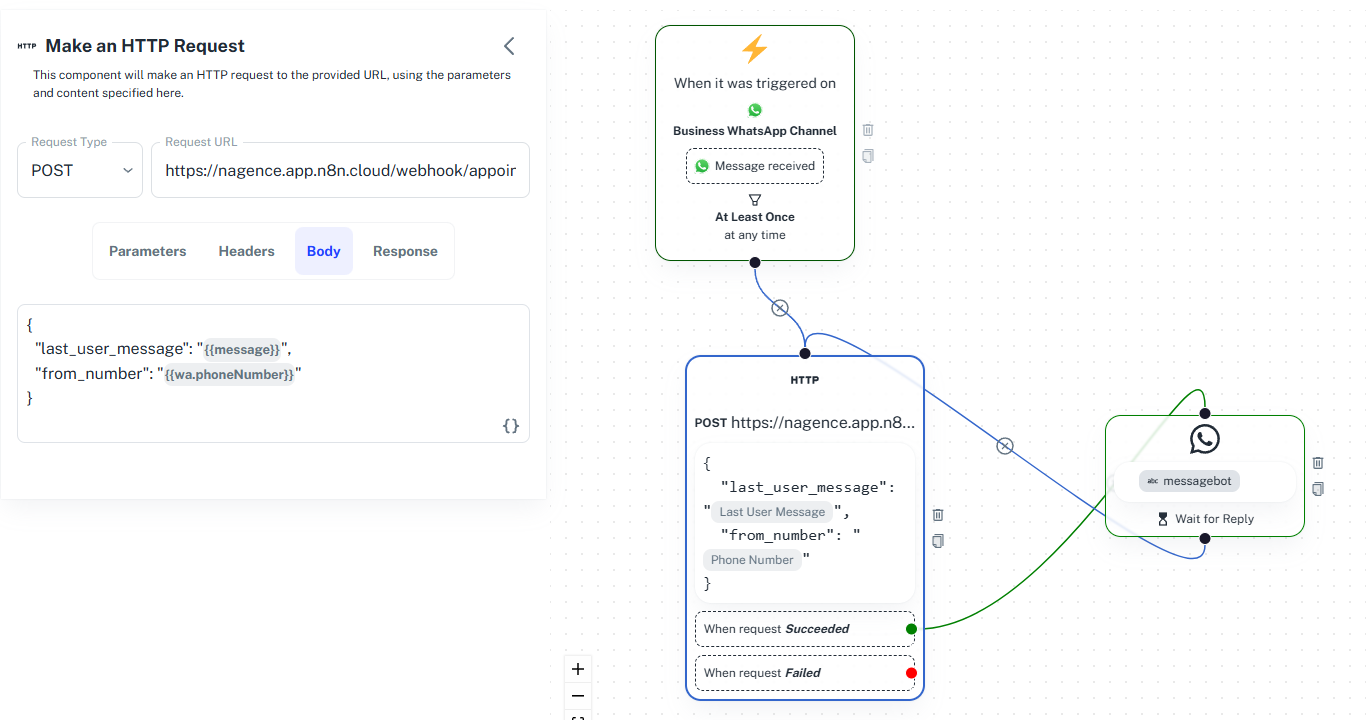
2Chat acts as the crucial link between your WhatsApp Business API and the n8n backend. Its conversation flow is designed to be simple and efficient:
Initial Trigger: The flow starts when a "Message Received" event occurs on your Business WhatsApp Channel.
HTTP Request to n8n: An HTTP node immediately sends a POST request to your n8n webhook. The request body includes:
{
  "last_user_message": "{{message}}",
  "from_number": "{{wa.phoneNumber}}"
}
- last_user_message: The exact message the client sent.
- from_number: The client's WhatsApp phone number (essential for the "Simple Memory" in n8n to maintain conversation context).
Wait for Reply: A "Message and Wait for Reply" node is set up to receive the response from n8n. It maps the output variable from n8n (which contains the chatbot's generated response) to a custom field, ready to be sent back to the user.
Looping Conversation: The "HTTP" node is connected back to the "Wait for Reply" node, creating a continuous loop. This ensures that the conversation seamlessly flows back and forth between the client on WhatsApp and your intelligent AI agent in n8n.
Best Practices to Reduce No-Shows and Increase Bookings
Automating the booking itself is the biggest win, but a few habits make the difference between a chatbot that books appointments and one that also keeps them.
- Send an automatic reminder 24 hours and again 1-2 hours before the appointment. This alone accounts for most of the no-show reduction businesses see.
- Make rescheduling and canceling as easy as booking. If a customer can only cancel by calling during business hours, they'll just skip the appointment instead.
- Confirm the details back to the customer (date, time, service, location) in the same message where you confirm the booking. It gives them something to reference and cuts down on "wait, what time was it again?" messages.
- Keep a human in the loop for edge cases. The chatbot should handle the routine 90% of bookings; anything unusual (a complaint, a special request, a VIP client) should route to a real person instead of forcing a rigid flow.
- Set a cancellation window that's realistic for your business. A rigid "no changes within 24 hours" rule might protect your calendar, but it can also push a customer to simply not show up instead of rebooking. Let the chatbot offer the next available slot in the same message where it processes a cancellation.
How to Tell If Your WhatsApp Booking Chatbot Is Actually Working
Once it's live, don't just assume it's helping. Watch a few simple signals over the first few weeks.
Look at how fast the first reply goes out. If it's instant regardless of the hour, that's the core promise of automation being kept. Look at how many conversations turn into a completed booking versus ones that stall out, where a customer asks a question the chatbot can't answer or the flow breaks somewhere. A high stall rate usually means the calendar rules need adjusting, not the chatbot itself.
Check whether no-shows go down after you add reminders. This is the easiest improvement to attribute directly to the automation, since it's a straightforward before-and-after comparison. And pay attention to how often conversations get escalated to a human, and why. Escalations aren't a failure. They're useful data on which requests are still too complex for the automated flow.
FAQ
- Do I need coding experience to set this up?
No. The workflow is built visually in n8n by connecting pre-built nodes (WhatsApp, AI agent, Google Calendar), and no custom code is required for the setup described above. - How much does it cost to automate WhatsApp appointment booking with 2Chat?
It depends on your WhatsApp Business API plan and message volume. Check current 2Chat pricing directly on 2chat.co before budgeting for a specific tier. - Does this work with Google Calendar and Cal.com?
Yes. The guide above uses Google Calendar, but the same n8n workflow can connect to Cal.com or Airtable instead, depending on how you manage your schedule. - Can customers book by calling instead of texting?
Yes. If phone bookings matter for your business, pair 2Chat with an AI voice agent built with ElevenLabs so calls get the same automated booking experience as WhatsApp messages. - What happens if a customer wants to reschedule or cancel?
The AI agent can handle simple reschedules and cancellations the same way it handles new bookings, by checking the calendar and updating the event. For anything more complex, it can hand the conversation off to your team. - Will customers get a reminder before their appointment?
Yes, as long as the workflow includes a reminder step. This is one of the easiest additions to the setup above, and one of the highest-impact ones for reducing no-shows.
Ready to stop losing bookings after hours? Create your 2Chat account and turn WhatsApp into a 24/7 appointment-booking assistant.